MCP Configuration in Cursor for Brand-Aware Coding Agents
Set up MCP servers to give coding agents direct access to brand decisions.
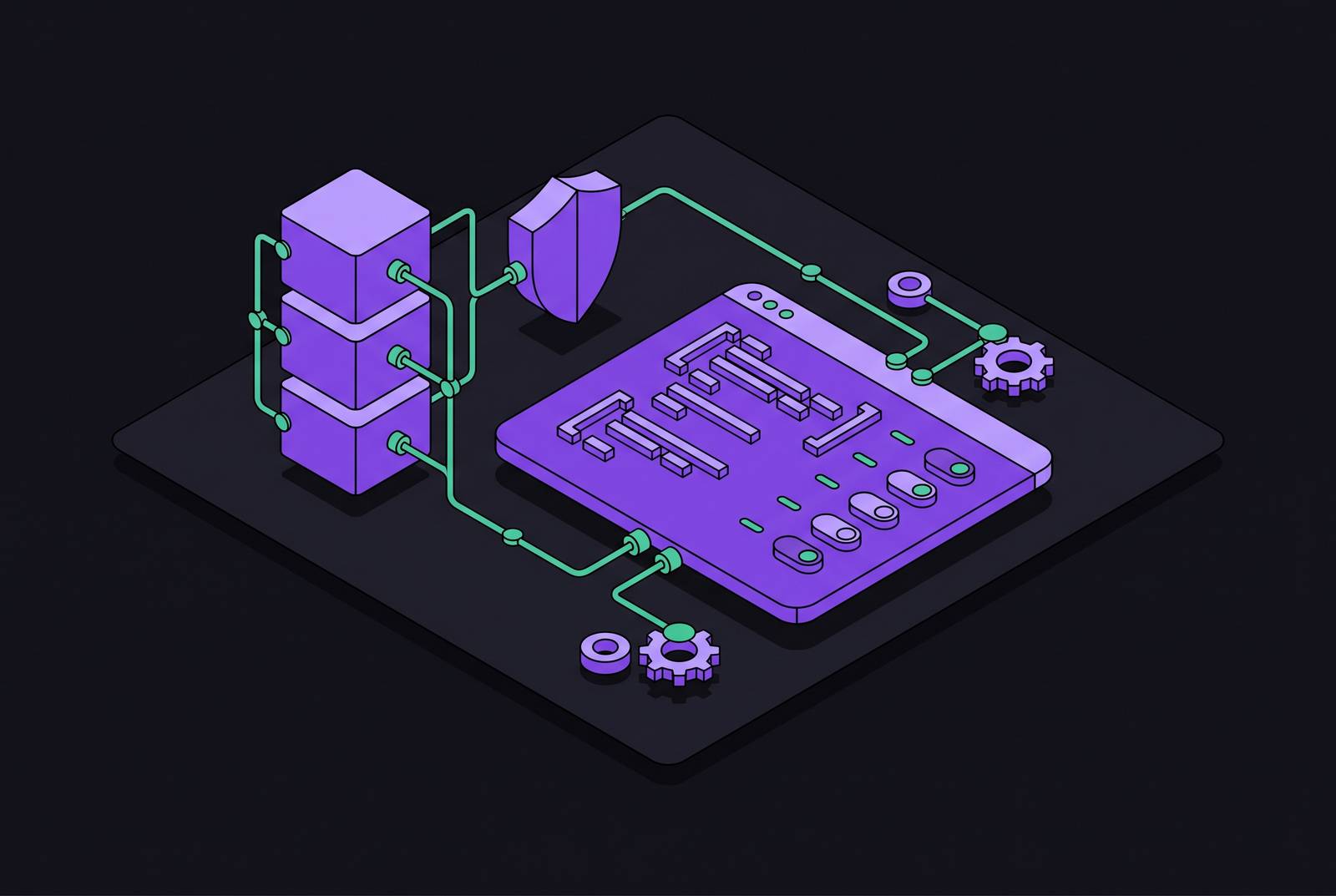
A coding agent retrieves brand decisions when Cursor’s MCP configuration provides access to them and guesses when it does not. Project-scoped servers, retrievable brand files, and Agent-compatible rules turn brand context into a shared dependency rather than something developers must paste into every prompt. The configuration succeeds only when the agent can reach that context and demonstrably uses it during generation.
Why Cursor's agent hallucinates brand decisions without external context
A primary color that changes slightly from one generated component to the next is a context failure. Without a structured source of brand decisions, Cursor’s agent falls back on generic defaults. It can understand the code around it but still lack the information it needs to make the right styling choice.
That distinction matters because a better-written request does not create a durable source of truth. Pasted guidance makes brand knowledge depend on what a developer remembers to include in a conversation. The missing connection is between the task being performed and the decisions that should constrain it. MCP supplies that connection by letting the agent query live, structured external data when it needs it.
What MCP actually does inside Cursor and why it is the right interface for brand context
MCP, or Model Context Protocol, is an open standard for discovering and calling typed external tools and resources at runtime. Once a server is connected, Cursor’s Composer and Agent mode can use its tools to retrieve a brand token set without asking the developer to copy it into the conversation. The capability belongs to the connected system. That makes MCP an interface for retrieval.
Cursor supports six protocol capabilities, namely Tools, Prompts, Resources, Roots, Elicitation, and Apps. Apps is a Cursor-specific extension for interactive UI views, while Resources allows context to be served as structured material. The same protocol also works with Claude Desktop, Claude Code, and other MCP-compatible clients. A brand context server can thus serve more than one coding environment, so each environment can use the same system for brand knowledge.
The two-scope configuration architecture — project-level vs. global mcp.json
Cursor resolves MCP configuration from two file locations. The project-level file, .cursor/mcp.json, sits in the project root and applies only to that workspace. The global file, ~/.cursor/mcp.json, applies across all Cursor workspaces on that machine. Brand servers belong at project scope because they hold context for a given client or product, while personal tools such as web search or GitHub belong at global scope.
Both files have the same JSON structure under a top-level mcpServers key. A local stdio server uses command, args, and env, while a remote HTTP server uses url and headers. For a remote brand service, the minimal structure is a brand-context entry containing the service endpoint and its authorization header. Committing the project configuration makes that server connection a shared, version-controlled part of the repository.
Cursor also exposes server management through Customize in the sidebar. Its toggle can pause a server without deleting the configuration. As of October 2026, Cursor’s CLI supports MCP servers for terminal-first workflows and uses the same configuration as the editor.
The 40-tool cap and why exceeding it silently breaks brand enforcement
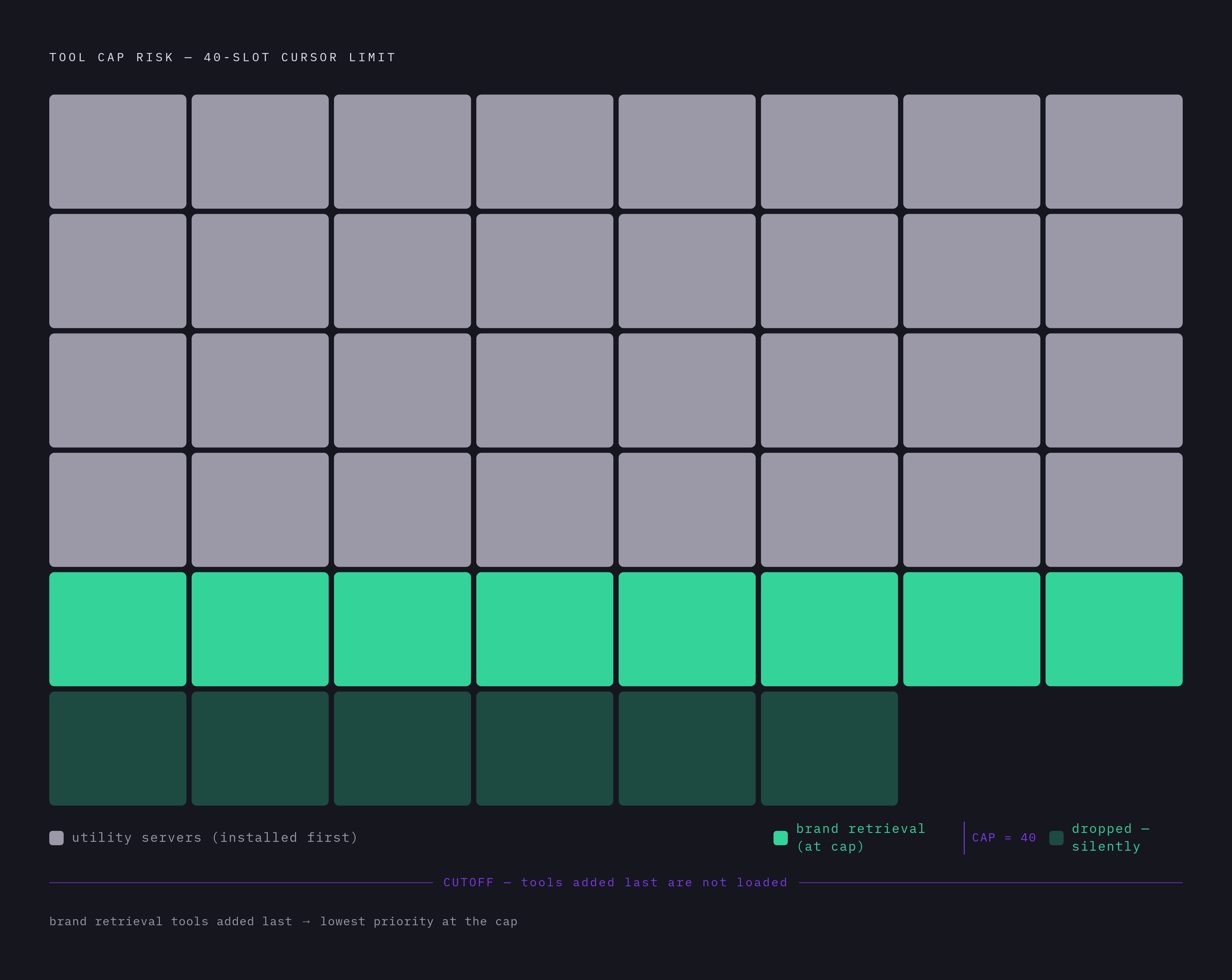
Cursor caps active MCP tools at 40 across all connected servers combined. Exceeding that limit produces a warning but no hard error, so the agent can lose access to tools without a configuration failure stopping the session. A server connection alone is therefore not proof that its retrieval tools remain available. This is especially consequential when brand enforcement depends on those calls.
Brand tools can fall out of reach when developers first install utility servers with many tools and then add brand retrieval. Figma token fetchers and voice profile lookups can become the lower-priority tools that drop out of reach. The practical response is to audit the total tool count before shipping a team configuration and keep brand retrieval concentrated in a server with few, high-value tools. Removing servers that are no longer used preserves room for the context that generation depends on.
Why.cursorrules is the wrong place for brand rules in Agent mode
Brand instructions in .cursorrules do not govern the Agent-mode loops that perform the heaviest code generation. The file is read in Agent (Chat). Rules also do not apply to Tab autocomplete, Inline Edit, or Bugbot PR reviews. Teams relying on that file for agentic brand enforcement need to migrate.
The supported format for this purpose is .mdc files in .cursor/rules/. Always Apply loads a rule for every request and suits the mandatory brand-read instruction, while Auto Attached uses glob matches for component-specific guidance in components/ui. Agent Requested lets the agent load the rules it needs for a task, including more detailed voice context when it writes copy. Manual attachment works for brand audits that are run as needed.
Always-apply rules should be short because they use tokens before the agent reads a file. The full brand specification belongs in retrievable context.
The three-layer file system that gives an agent retrievable brand context
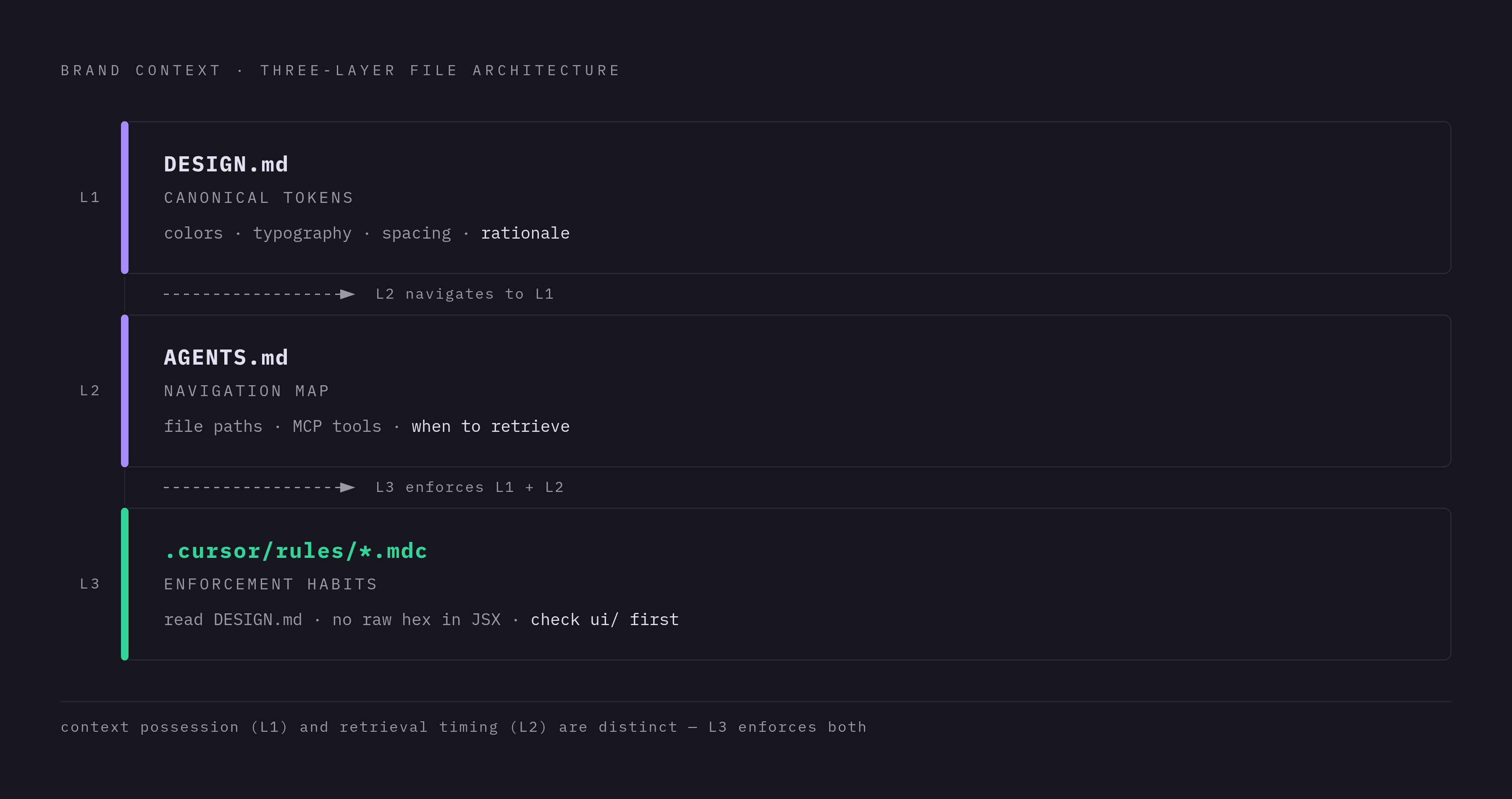
The file architecture separates brand knowledge, navigation, and enforcement. DESIGN.md holds canonical design tokens and the rationale behind them, including color, typography, and spacing. It gives the agent a plain-text baseline to read before styling or component work begins. Its purpose is to state the values and explain their use, rather than make the agent infer them from existing code.
AGENTS.md then acts as the map. It identifies where brand files live, which MCP tools retrieve live tokens, and how the file-based and remote sources relate. That navigation matters because possessing context and knowing when to retrieve it are different problems.
The .cursor/rules/*.mdc layer enforces the habits that make the other files useful. An always-apply rule should tell the agent to read DESIGN.md, ban raw hex values in JSX, and make it check components/ui before it creates a component. Semantic tokens such as bg-primary and text-foreground keep generated styling tied to the system. Agencies can copy a template .cursor/rules folder into each client export to carry these habits across repositories without having to hire someone for design ops on every project.
Connecting Figma's design system to Cursor via MCP
Figma has supported third-party agent access through MCP since June 2025, with write access added in early 2026. This gives Cursor structured design system data, including actual token values and component trees, rather than forcing it to infer decisions from screenshots. The live-data layer complements the file architecture by supplying the design values that a task needs. It reduces reliance on hand-maintained markdown as the only source of current tokens.
Code Connect links Figma components to the components that match them in code. The MCP server pushes the live canvas to Cursor, the agent produces a first pass using existing components, and a developer reviews it. For bidirectional token sync, figma-console-mcp exports Figma variables to DTCG JSON and pushes code-side edits back. That keeps the design source and codebase from drifting independently.
The integration has a practical boundary. It works well on small frames such as cards, dialogs, and single sections, but degrades on full-page layouts with many nested groups. The established workaround is to split the frame into sections, run MCP for each section, and then assemble the result.
What Figma tokens still cannot give the agent — and why brand context requires a separate layer
Positioning, tone of voice, audience understanding, and creative principles have often lived in PDFs and slide decks written for designers. These documents are hard to parse reliably when literal values are in images and the guidance offers inspiration without setting constraints. Making that material agent-readable requires extracting values, structuring tokens, and stating the compositional decisions left implicit.
The W3C Design Tokens Community Group released its first stable standard for a token format on October 28, 2025. Each token carries a name, a type, and a value, with optional properties including $description, $extensions, and $deprecated. That structure makes visual rules machine-enforceable, but a token format alone does not supply the missing voice or audience decisions.
The model for the wider brand identity has three parts, a Voice Profile, a Body of Work, and Design Tokens. These capture how the brand speaks, evidence of how it actually sounds, and its visual and structural rules. The expectation in 2026 is that these become maintained, queryable artifacts. Rainbrand’s Brand Skill provides this separate context layer through shared, versioned brand identity, guidance, and assets that agents can retrieve, apply, and update.
Wiring a brand context MCP server into the project config — a complete working example
The remote connection goes in .cursor/mcp.json, under the root mcpServers object. Within it, a brand-context entry uses url for the brand API endpoint and headers for the authorization header carrying the bearer token. A service such as Rainbrand’s Brand Skill API runs remotely, so the connection needs no local process or npm package. The endpoint, credential, and retrieval tool names must come from the service being connected, because no concrete values are supplied here.
The autoApprove array names the read-only retrieval tools that the agent may call without prompting. It should allow token and voice-rule retrieval while leaving write operations subject to explicit confirmation. The project configuration then records the server that the team depends on, much as package.json records a package that the team depends on. The distinction is that the remote service supplies current context when called rather than embedding the brand content in the configuration.
Pair that connection with the three file layers, using DESIGN.md for the baseline, AGENTS.md to guide live retrieval, and the always-apply rule to require both before the agent works on styled components. When Rainbrand updates a Brand Skill, agents that use it get the change on the next tool call without anyone having to update a prompt, markdown, or local configuration.
Testing that the agent is actually using brand context, not ignoring it
A configured server is not yet evidence of brand-aware generation. Open the Output panel with Cmd+Shift+U on Mac and select MCP Logs to check that the brand server started without errors. Then check Customize to confirm that the server is active and toggled on.
The behavioral test is to ask Composer for a new UI component without supplying brand instructions in the prompt. Inspect whether the output uses brand tokens and theme fonts rather than raw hex values, Inter, or arbitrary spacing. Then inspect MCP Logs for brand-server tool calls during the styling task. If no calls appear, the agent is not reaching the server despite its connected state.
Repeat verification after adding any MCP server, because the additional tools can push brand retrieval beyond the cap.
What this configuration makes possible beyond individual code sessions
Developers who open the same repository get the same server connection, and agent tasks follow the same rules without anyone having to brief the agent in each prompt. Rainbrand’s centrally updated, versioned Brand Skill lets design-system changes reach agent-generated work through subsequent retrieval. The durable asset is the connection between maintained decisions and the tasks that must apply them.
Each repository points to its own client’s Brand Skill, so developers can switch projects to change brand context without having to brief the agent again. As the public MCP server registry expands, more analytics platforms, content APIs, and asset managers can connect to this foundation.