Figma MCP Server for Design Token Retrieval
AI agents need access to your design tokens, not just your designs, to generate on-brand code.
AI coding agents produce off-brand output because they lack access to the structured brand values a design system encodes, not because they generate code poorly. An agent asked to turn a Figma frame into working UI has to fill in a thousand small decisions: what shade of blue, what font weight, what spacing between elements. Without a token system to consult, it fills those gaps with plausible guesses: a hardcoded hex value instead of a variable, a typography override instead of the system default, hand-written CSS where a utility class already exists in the codebase. The failure doesn't announce itself. The output looks correct at a glance and only falls apart on closer inspection or once it's running across dozens of screens built the same way.
The monday.com engineering team ran into this directly. They pasted a Figma link into Cursor, let the Figma MCP server run, and got back a generated UI that matched the design reasonably well on the surface. The colors were hardcoded, the typography overrode system defaults, and none of the actual design system components had been used. The team's diagnosis was specific: the agent had no understanding of what the design system actually was. It didn't know which components existed, which props were valid for them, which tokens were required, or which accessibility rules were non-negotiable. When a team generates many screens with the same blind agent, one bad habit turns into the house style.
What the Figma MCP server exposes
The Figma MCP server is a structured design-context layer: it exposes the contents of a Figma file as queryable, machine-readable data that an agent can act on directly.
MCP governs how AI agents reach external tools and data sources, and that's what makes it an open standard. Figma's implementation applies that standard to design files specifically. Figma runs its own first-party MCP server, and the preferred way to connect to it is remote, over Streamable HTTP with OAuth for authentication, so most workflows can skip running the Figma desktop app. In its current evaluated form, the server declares 18 tools, and the read path, the tools that fetch design context and variables, is the most dependable part of that toolset.
The distinction that matters here is between structure and meaning. One category of tool tells an agent how a design is laid out: what frames exist, how they nest, what components appear where. A separate category, the design token layer, tells the agent what values to use and what those values are for: color, spacing, typography, and the intent behind each one. That second category is surfaced through get_variable_defs and the related variable tools, and it's the part of the server this piece is concerned with. Code quality in the end depends on three things working together: how the Figma file is structured, how well the AI model processes the context it's given, and how the prompts are written. The MCP server's job is to supply that context faithfully. The other two are the team's responsibility.
How get_variable_defs retrieves design tokens
get_variable_defs retrieves the variables and styles used in a given Figma selection, the typed, named, multi-mode values that make up an actual design token system, and hands them back as structured data the agent can reference directly at generation time.
Figma organizes these tokens into Collections, and within a Collection, Modes represent variants such as light and dark themes, or entirely separate brand treatments. What an agent gets back from get_variable_defs is a typed variable with a name, a resolved value, a mode, and a collection attached, which is exactly the information needed to write var(--color-action-primary) in code.
The Figma REST API exposes the same underlying data through two endpoints: GET /v1/files/:file_key/variables/local, which returns all local and consumed remote variables in a file with multi-mode support through a valuesByMode field and a codeSyntax field, and GET /v1/files/:file_key/variables/published, which returns tokens published for use across files. Both require the right plan access to call.
One detail trips up a lot of prompt-writing in practice: Figma's raw color values arrive as floating-point RGB channels between 0 and 1, not as hex codes. Black comes through as {r: 0, g: 0, b: 0, a: 1}, white as {r: 1, g: 1, b: 1, a: 1}. An agent has to convert that into whatever format the target codebase expects, hex or rgba(), at generation time, so a prompt should state the desired output format explicitly.
When a file also has Code Connect mappings set up, the agent gets one step further: it receives the link between a given Figma component and the real component already living in the codebase, which is what lets it reach for an existing Button. A reasonable objection here is that an agent could just look at the design and infer the colors visually. It could, but visual inference only produces an approximation. get_variable_defs returns the exact value along with its semantic name, and that precision is what downstream systems, whether CSS, iOS, or Android, need in order to render the same value consistently everywhere it's used.
How token structure affects retrieval usefulness
The Figma MCP server's usefulness rises sharply when the file behind it is organized as a genuine design system, and it drops just as sharply when the file isn't. When a file is poorly structured, the agent gets back context it can't act on reliably, no matter how capable the retrieval tool is.
The evaluated verdict on Figma MCP makes this point directly: the tool works best for teams repeatedly implementing well-structured Figma designs, particularly teams with reusable components, variables, design tokens, Code Connect mappings, and a recurring design-to-code workflow. Giant, unstructured files are flagged as a scenario to think twice about, since they produce what the evaluation calls large but low-value context: plenty of data, little of it usable.
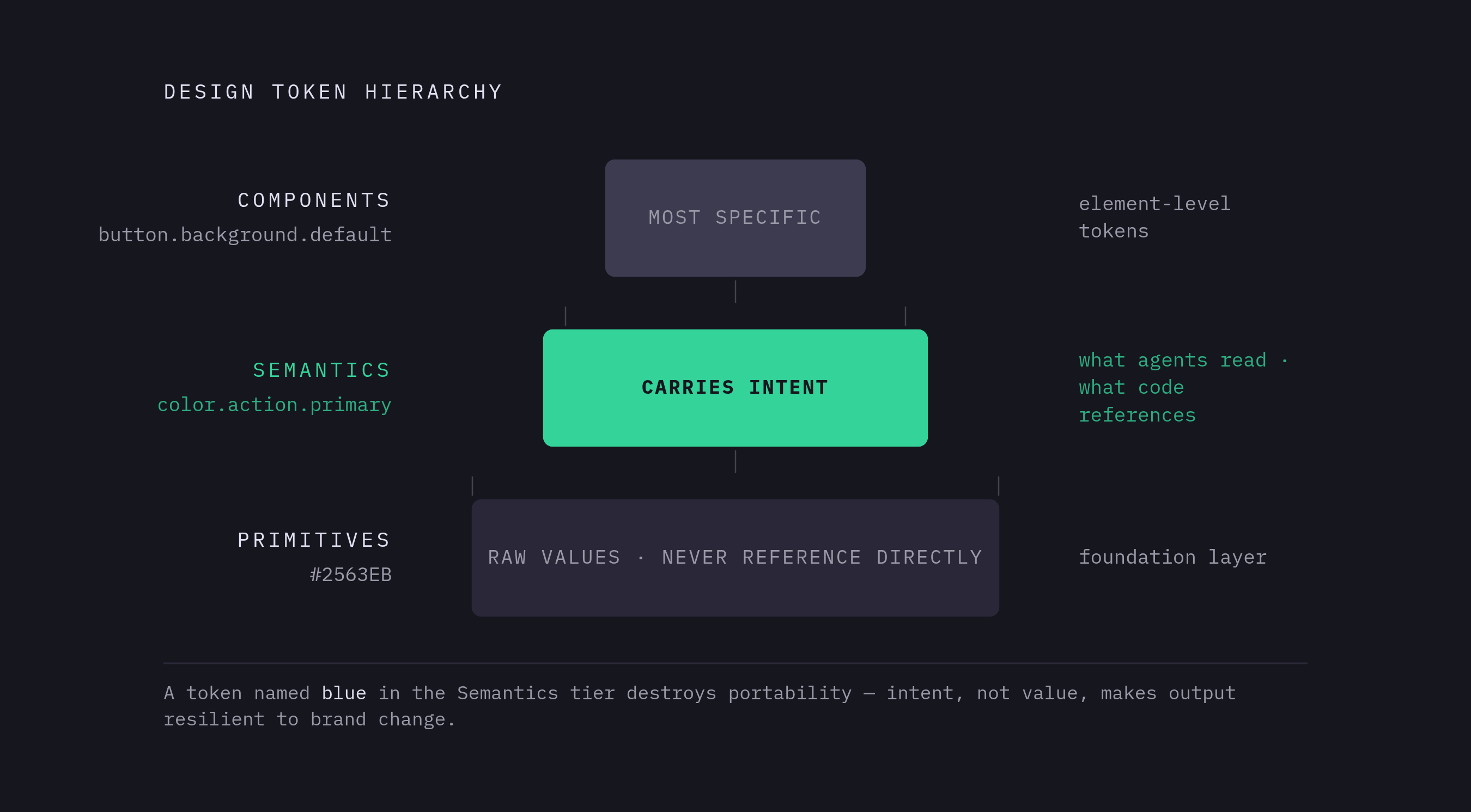
Three layers make up the token hierarchy that keeps retrieval reliable. Primitives sit at the foundation: raw values, a specific blue hex code, for instance, that should never be referenced directly inside a component. Semantics sit above that: intent-based names like color.action.primary that describe what a value is for rather than what it is, and these are what agents should read and what code should actually reference. Components sit at the top, the most granular layer of the three, and they carry element-specific tokens such as button.background.default.
Semantic naming is what hands an agent intent. A token named color.action.primary tells the agent exactly which situations call for that value: primary actions, and nothing else. A token simply named blue tells it nothing about when it applies, and it breaks the moment the brand shifts its primary color to a different hue, because nothing in the name carried that meaning forward.
Collections and Modes are the mechanism Figma Variables use to manage multiple brands and themes at once. A single Collection can carry both a Light mode and a Dark mode, and separate Collections can carry entirely separate brand themes, all inside the same file. The W3C Design Tokens Community Group's stable specification, backed by organizations including Adobe, Google, Meta, Figma, Microsoft, and Salesforce among dozens of others, establishes the DTCG format as the standard interchange format for token data. A Figma file organized around that standard produces token JSON that moves cleanly into CSS, iOS, Android, and Tailwind without a team having to hand-build a translation layer in between.
Working within the context-size ceiling
When large or unstructured Figma nodes exceed the context limits of an MCP response, the design data reaching the agent gets silently truncated, so the output comes out incomplete or inconsistent, and you get no warning that something was cut.
This isn't a rare edge case. Context completeness scores 67 out of 100 in the evaluated profile of Figma MCP, and the documented reason is that large nodes can exceed client output limits and produce incomplete context. Figma's own guidance addresses this head-on: call get_design_context first, since that's the default entry point. If the response comes back too large or looks truncated, call get_metadata instead to get a high-level map of the node structure, identify the specific child nodes that matter, and re-fetch only those smaller targets with get_design_context. The same logic applies to token retrieval specifically: scoping a call to one component or one frame, rather than an entire page, cuts the payload down and makes what comes back more trustworthy.
monday.com's answer to this problem was architectural, built around a full workflow. Instead of asking an agent to generate code from one large Figma context in a single pass, the team built a workflow made up of 11 nodes, each handling a single, well-defined responsibility in the translation from design to code. The agent assembles structured context incrementally across that pipeline, and different microfrontends format their output against their own codebase conventions.
You face the same choice, for the same reason, between the remote server and the desktop server. The desktop server supports selection-based context, so you can scope the MCP response to exactly the frame currently selected inside the Figma application, and that matters when a complex file's size makes a full-file fetch impractical. Rate limits are also a real constraint at lower-quota plan tiers, so any team running agent workflows at meaningful frequency should treat paid access as the practical floor, not an upgrade to consider later.
Structuring the Figma file so the MCP workflow is reliable for a team
A Figma file built to support reliable MCP-based token retrieval is organized for machine consumption from the start: named variables arranged in a three-tier hierarchy, Code Connect mappings attached to reusable components, and node sizes kept small enough to stay under the context ceiling described above.
On the variables side, start by creating a dedicated Variables Collection for each tier: one for Primitives, one for Semantics, one for Components. Name semantic tokens by what they're for, not by what they look like: action.primary, not blue-600. You can use Modes within a Collection to carry light and dark themes, or separate brand variants, because this is exactly the multi-mode data that get_variable_defs hands back to an agent. If the design system spans more than one file, publish the variables across files so that get_published_variables can surface them to agents working anywhere in the component library, not just in the file where the tokens were first defined.
Code Connect is the second piece, and it carries measurable weight. Mapping a Figma component to its real codebase equivalent is what tells an agent to reuse the existing Button rather than generate a new one that merely looks similar. When the Coinbase Design System team added Code Connect mappings, design system adherence in generated output improved, and token costs fell by an average of roughly a fifth. It's a direct effect of giving the agent a concrete mapping to reuse. Teams setting this up should prioritize Code Connect on the components used most often first: navigation, buttons, form elements, and cards, since those are the components an agent will be asked to reproduce most frequently.
Node organization is the third piece, and it connects back to the context ceiling. Keep individual frames and components scoped tightly, so an agent never has to pull an oversized context payload just to reach one button. Name layers and components consistently throughout the file, since agents read those names as semantic signals when they're parsing structure, and a vague layer name carries no more information to an agent than it would to a new team member opening the file for the first time.
If your team runs a multi-brand or agency setup, you can assign token Modes per brand in a master design system, so one component library can serve multiple clients while each keeps its own distinct visual identity. The agent just reads the correct Mode for whichever brand it's generating for at retrieval time, and it needs no separate file or separate prompt logic.
Connecting the token retrieval pipeline to code generation
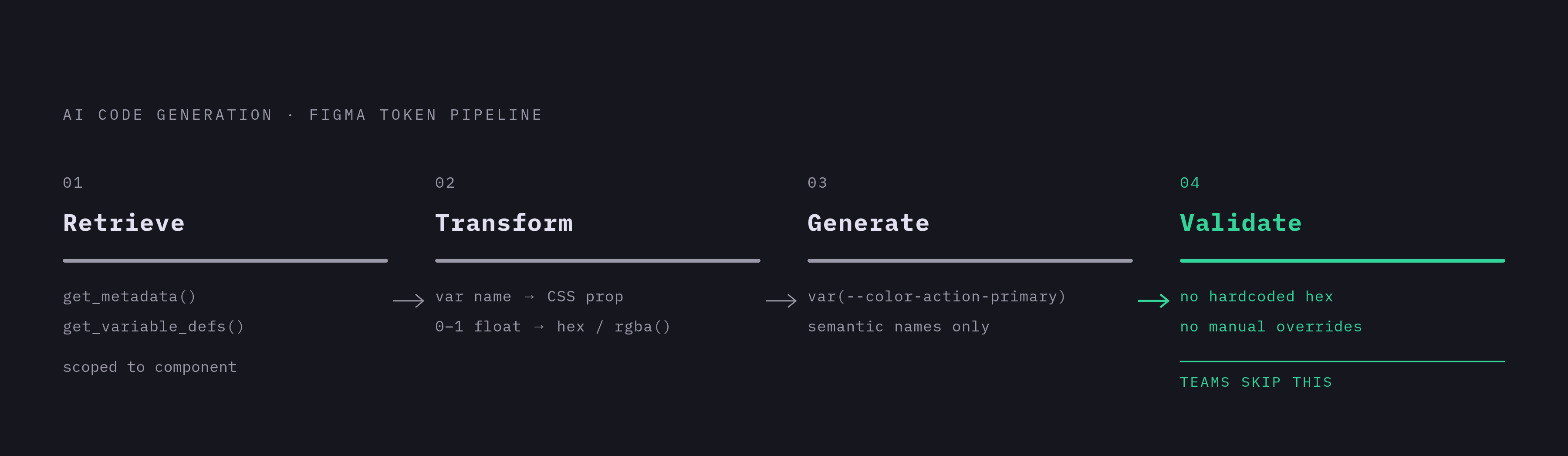
The reliable version of this workflow is a sequence: retrieve the token context, transform it into a form the agent can use, generate code that references tokens by name, and validate that the result contains no hardcoded values that should have been token references.
Retrieval comes first. Call get_metadata to orient on the file's overall structure, then call get_variable_defs, or get_local_variables, to pull the token layer scoped to the specific component or frame in question.
Transformation comes next. The agent maps each Figma variable name to its CSS custom property equivalent, and this is the step where Figma's 0 to 1 float RGB values get converted into hex or rgba(), depending on what the prompt specified as the target format.
Generation follows from there. Code should reference tokens by their semantic name, var(--color-action-primary), so that the output stays tied to the design system instead of to a value that can silently drift from it. That one choice is what makes the output compatible with the rest of the system instead of a one-off block of markup that happens to look right today and breaks the moment the brand updates a color.
Validation closes the loop. Someone, or some automated check, confirms that no hardcoded hex values or manual CSS overrides have crept in where a token reference belonged. This is the step that catches the exact failure mode described at the start: colors baked in by hand, typography quietly overriding the system default, components reinvented instead of reused.
For teams moving through the Figma Variables to JSON to code path specifically, Figma Variables can be exported to DTCG-compatible JSON today through third-party plugins, since native DTCG export isn't yet built into Figma itself. From that single JSON file, the pipeline branches outward to CSS custom properties, TypeScript types, Tailwind configuration, iOS, and Android. Update a token once in Figma, and that change propagates automatically to every downstream target the pipeline touches, the entire point of building the token layer this way.